


You may notice that some images look blurry or pixelated after installing a new theme. To fix this, you should regenerate your site's thumbnail images whenever you install a new theme.
How to regenerate your site's thumbnails
1. Go to Settings > Media in your dashboard. Check that the sizes are set to the numbers shown below:
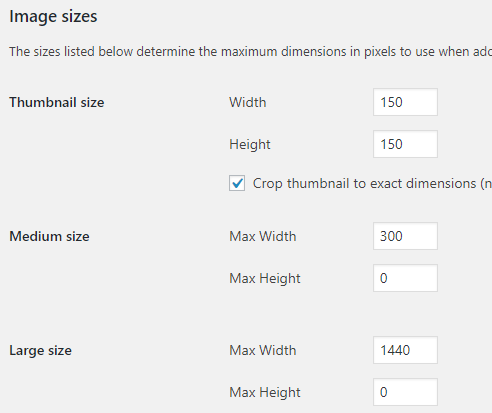
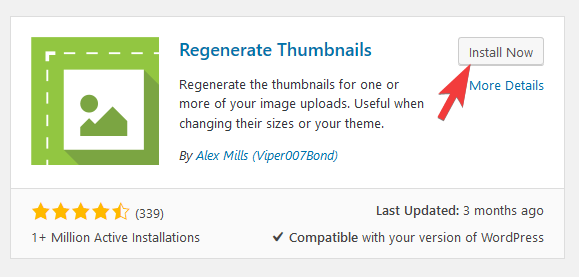
2. Install the "Regenerate Thumbnails" plugin by going to the Plugins > Add New page in your dashboard. Search for "Regenerate Thumbnails", install and activate the plugin:
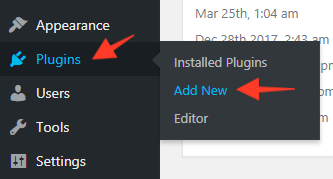
2. Go to Tools > Regenerate Thumbnails
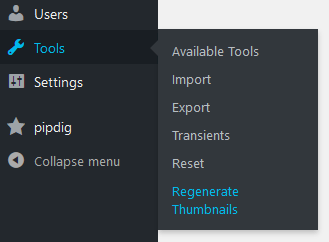
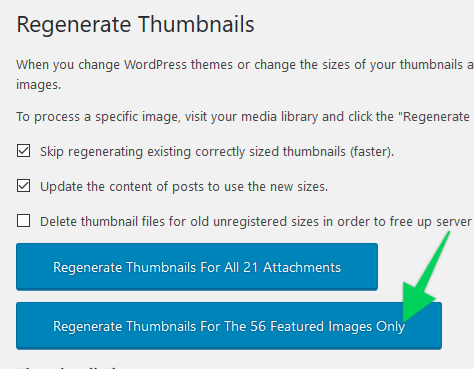
Leave all the settings as their default options.
3. Click the "Regenerate Thumbnails For The x Featured Images Only" button
Regenerating your site's thumbnails might take several hours if you have lots of images. You may wish to leave it running in a tab whilst you work on the rest of your site. You can edit any other section of your site whilst the process is running in the background.
Affiliate Disclaimer: I sometimes insert third-party link of products and services to help cover the costs of running this website. I only recommend products that I have used and think are worth given a try. Your free will ❤ Donation will be appreciate 😍
Follow me on: Facebook | Twitter | Instagram | Linkedin | Tiktok | YouTube
Disclaimer: The materials on this website is given for general information only and does not guarantee 100% solution. I accepts no responsibility for loss or no liability occasioned to any person acting or refraining from acting as a result of material contained in this website.
Post a Comment